Tricentis Tosca
The Maintenance Trap No One Talks About
There is a quiet problem in most enterprise QA teams, and it rarely shows up in sprint reviews. It shows up on Monday mornings, when an automation engineer opens a dashboard and discovers that forty percent of overnight regression tests have failed. Not because the application broke. Because a Salesforce release tweaked a Lightning component, or because an SAP Fiori patch regenerated a handful of element IDs.
The tests were fine. The product was fine. But the automation could not keep up.
This is the maintenance trap: the more an organisation invests in automated testing, the more brittle that investment becomes as the applications underneath it keep moving. And in platforms like Salesforce and SAP, things move constantly. Salesforce ships three major releases per year, plus continuous updates to managed packages and Lightning components. SAP S/4HANA migrations and Fiori design system updates can shift UI structures in ways that take days to untangle.
Self-healing in Tricentis Tosca was built to break this cycle. This article explains how it works, why it matters specifically in Salesforce and SAP environments, and what realistic before-and-after scenarios look like in practice. We will also cover where self-healing has real limits, because knowing those matters just as much as knowing the benefits.
What Self-Healing Actually Means in Tosca
Most automation frameworks treat element identification as a single-point problem: find the element by XPath, by CSS selector, or by ID. If that locator breaks, the test fails. A human has to open the IDE, inspect the updated DOM, rewrite the locator, and push a fix. In a suite of two hundred test cases, this can consume the better part of a sprint.
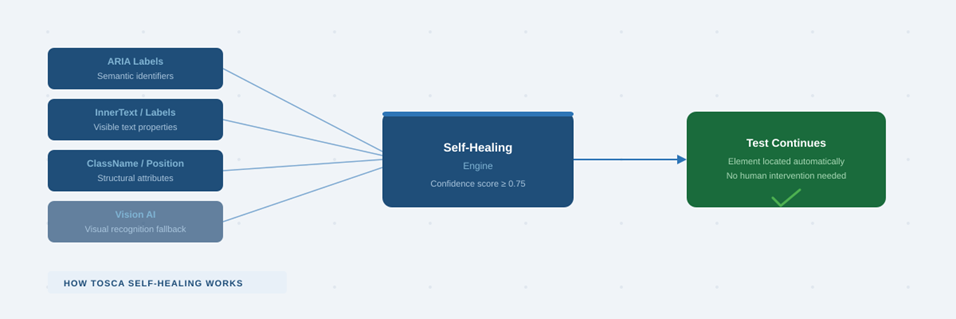
Tosca approaches identification differently from the ground up. When you scan a UI element using tools like XScan or the Salesforce Scan Engine, Tosca does not just capture one locator. It captures a profile: a collection of technical attributes including ClassName, InnerText, DefaultValue, ARIA labels, structural position, and more. These are stored in what Tosca calls the Self-Healing Properties section of the Module Attribute.
During execution, if the primary identifier fails, Tosca does not stop. It evaluates the current state of the application against that stored profile, calculates a confidence score for candidate elements, and selects the best match — if and only if the match exceeds a defined reliability threshold. The test continues. No human required.
Tosca adds a second layer with Vision AI, which can identify elements visually when technical properties are missing or have changed significantly. This is particularly useful when DOM structures are deeply nested or dynamically generated, as is common in both Salesforce Lightning and SAP Fiori applications.
Self-Healing Modes: Choosing the Right Approach
The behaviour of self-healing is controlled by a Test Configuration Parameter (TCP) called SelfHealing, which can be set at the project, folder, or individual test case level. Three modes are available:
Weighted mode is the right default for most enterprise projects. It is worth noting that properties scanned automatically by XScan or Salesforce Scan receive calculated weights; any properties added manually are initially ignored until a rescan re-evaluates their importance. The 0.75 confidence threshold can be adjusted — stricter thresholds reduce false positives in critical workflows, while lower thresholds can recover tests in environments with more UI volatility.
Why This Matters More in Salesforce and SAP Than Anywhere Else
Self-healing is useful in any application, but Salesforce and SAP represent the most demanding cases for enterprise test automation. Both platforms combine high update frequency with architectural complexity that makes traditional locator strategies particularly fragile.
The Salesforce Challenge
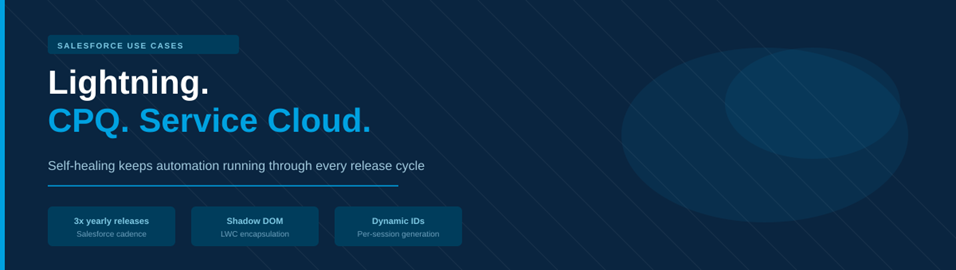
Salesforce Lightning Experience introduced two challenges that traditional automation tools were not built for. The first is Shadow DOM encapsulation: Lightning Web Components wrap their internal structure in a shadow root, meaning standard Selenium-based selectors often cannot reach the elements they need. The second is dynamic ID generation, where Salesforce assigns new element identifiers per session, making any locator that relies on a static ID unreliable by definition.
Add to this the cadence of change: three major releases per year (Spring, Summer, Winter) plus ongoing managed package updates from third-party AppExchange vendors. An automation script written in January may encounter four or five meaningful UI changes before the year is out.
Tosca’s Salesforce Scan Engine was purpose-built for this environment. It navigates Shadow DOM boundaries, captures Lightning-specific metadata including component names and ARIA attributes, and feeds that richer profile to the self-healing engine. The result is that a quarterly release is far less likely to cause a test failure than it would be in a conventional framework.
The SAP Challenge
SAP environments introduce different but equally significant challenges. Many organisations run hybrid landscapes that include both classic SAP GUI (desktop) interfaces and modern SAP S/4HANA Fiori applications. Fiori’s design system assigns auto-generated, session-specific IDs to most interactive elements, creating the same dynamic ID problem as Salesforce but in a different technical context.
SAP S/4HANA migration projects compound this: as organisations move from ECC to S/4HANA, entire application screens are redesigned. Business logic stays the same, but the UI above it can change substantially. Without self-healing, these migrations trigger waves of test maintenance work that teams rarely budget for correctly.
Beyond individual element identification, SAP applications frequently reuse the same UI control patterns across multiple screens. ALV grids appear in dozens of transactions with nearly identical structures. This creates a specific risk with self-healing: without proper configuration, the engine might heal to the correct control type but the wrong instance. The mitigation requires combining anchor-based identification with Tosca’s ExplicitName parameter, which constrains healing to the correct DOM scope.
Salesforce Use Cases:
Use Case 1: Opportunity-to-Quote Testing
Converting an Opportunity to a Quote is one of the most tested workflows in enterprise Salesforce environments. It is business-critical: the product lines, pricing matrices, and discount tiers from the parent Opportunity must carry over accurately to the Quote record. Finance and sales operations teams rely on this data to be correct.
A typical Tosca regression flow for this workflow follows these steps:
- Open a populated Opportunity record via global search or parameterised URL
- Navigate the dynamic related lists to locate the New Quote action button
- Validate that all copied product data, tier configurations, and custom fields match the parent Opportunity
- Check total calculations against expected baseline values
Now consider what happens during a quarterly Salesforce release. Suppose an internal administrator updates the Lightning page layout, or the release itself shifts the DOM structure around the New Quote button. The Shadow DOM path that the test was using has been deprecated.
Use Case 2: CPQ Quote Refresh and Pricing Validation
Salesforce CPQ is the most technically challenging Salesforce surface to automate. It renders configuration grids inside deeply nested iframes, applies layered pricing rules dynamically, and changes frequently when managed package updates arrive from Salesforce’s CPQ team.
The Refresh Prices action is a mandatory automation target for any organisation with a financial compliance requirement. A realistic regression test for this workflow includes:
- Opening a complex CPQ quote with multiple bundled line items
- Updating line quantities or discount percentages
- Locating and clicking the Refresh Prices button
- Validating that recalculated totals and line-item margins reflect the updated price book values
Managed package updates frequently regenerate the technical IDs of controls like Refresh Prices. Without self-healing, this breaks the test. With self-healing, Tosca identifies the button using semantic label text, Lightning metadata, or visibility-related custom fields exposed via the CPQ scan optimisation parameters. Revenue-critical workflows stay green.
Use Case 3: Service Cloud Console Workflows
Salesforce Service Cloud’s console interface is genuinely difficult to automate. It is dense, multi-tabbed, and built on nested iframes — each of which can have dynamically generated IDs. A typical customer support regression test involves:
- Opening an incoming case from an omnichannel queue
- Launching a Quick Action from the Highlights Panel
- Updating case status, entering resolution notes, and executing a macro
- Saving the case and closing the tab to return to the queue
Tosca 2024.2 introduced enhanced self-healing capabilities specifically targeting iframe-heavy environments. It detects structural changes within embedded iframes and maintains navigation across complex DOM boundaries. Combined with anchor-based identification, this allows the engine to distinguish between a Save button in a diagnostic sub-tab and a global Save in the primary tab.
SAP Use Cases:

Use Case 1: S/4HANA Purchase Order Creation
Purchase Order creation in SAP S/4HANA’s Fiori “Manage Purchase Orders” app is a foundational procurement workflow. Buyers interact with item hierarchies, enter quantities and delivery dates, and execute the release process that triggers backend posting.
A Tosca regression flow for this scenario typically covers:
- Initiating the requisition-to-purchase-order conversion via the Fiori app
- Selecting suppliers and navigating item hierarchies
- Entering quantities and delivery details in dynamic Fiori grids
- Executing the release process to trigger the backend workflow
Use Case 2: Multi-Stage Procurement Operations
SAP procurement is not a single transaction; it is a chain. Requisition approval, vendor selection, PO creation, goods receipt, and inventory processing all feed into each other. A minor UI change in vendor selection — one step out of ten — should not invalidate eight downstream validations. With self-healing absorbing that localised disruption, the rest of the chain executes normally.
Use Case 3: SAP Order Management — Where to Be Careful
SAP Order Management screens frequently reuse the same UI controls across multiple rows in a grid. Quantity fields, unit of measure dropdowns, and delivery date pickers can appear dozens of times in a single screen with nearly identical DOM properties. If self-healing activates on a Quantity field whose ID has changed, it may identify the correct type of control but the wrong row instance.
The fix is not to disable self-healing but to configure it correctly:
- Use anchor-based constraints to limit the healing search scope to the correct row or section
- Apply Tosca’s ExplicitName parameter to target elements by index or explicit context
- Combine stable parent-element anchors with dynamic child expressions
- Apply stricter confidence thresholds in screens with high element density
Before and After: Summary
The table below summarises the key scenarios discussed and what self-healing changes in practice:
Best Practices: Getting Self-Healing to Actually Work
Self-healing is not a setting you enable and forget. Its value depends directly on how well the underlying modules are built. Here is what makes the difference:
Build Strong Foundations First
Self-healing performs best when it has a rich property profile to work with. This means spending time during initial module creation to capture meaningful attributes — visible text, ARIA labels, business-relevant identifiers — rather than relying on whatever the scanner picks up by default. Properties that are stable across releases should be prioritised and given appropriate weight.
Use Anchors in Complex Screens
In both Salesforce console interfaces and SAP Fiori grids, anchors are not optional; they are required for reliable healing. An anchor is a stable parent or sibling element that constrains the healing search to the correct region of the screen. Without anchors in dense or reused-control environments, you will eventually get a healed test that is interacting with the wrong element.
Review Healing Logs Regularly
Tosca logs every healing event. A test that heals once is probably fine. A test that heals on every run is telling you something: either the underlying application has changed permanently and the module needs updating, or the locator strategy was not stable enough to begin with. Both are signals worth acting on.
Tune Thresholds to Match Stakes
A test that validates a customer-facing pricing calculation should have a higher confidence threshold than one that validates a navigation breadcrumb. Configure the SelfHealing TCP and confidence levels to reflect the risk profile of each workflow, not a single default across the whole project.
Treat Healing as a Signal, Not Just a Solution
When something heals, investigate why. Frequent healing in a particular area of an application often surfaces UI instability that development teams should know about. Self-healing keeps the test pipeline moving; it should also be generating information that improves the product.
Limitations Worth Being Honest About
No section on self-healing is complete without a frank discussion of what it cannot do.
1. Major redesigns: Major architectural changes require rescanning, not healing. If a Salesforce org migrates from Classic to Lightning, or an SAP landscape moves from ECC to S/4HANA, self-healing will not bridge that gap. A full rescan and module rebuild is required.
2. Overuse: Overuse degrades performance and obscures real problems. A suite where most tests are healing on most runs is a backlog of locator debt accumulating invisibly. Execution slows and debugging becomes harder.
3. Masking instability: Healing can mask application instability.If the UI keeps changing and self-healing keeps absorbing it silently, development teams lose visibility into the churn. Build a reporting cadence that surfaces healing frequency to the broader team.
4. False positives: False positives are the most significant risk.When multiple elements share similar properties ,common in SAP grids and Salesforce console tabs ,the healing engine may select the wrong element. Anchors and threshold tuning are the mitigations, but they require deliberate configuration.
Conclusion
Self-healing in Tricentis Tosca solves a real and costly problem in enterprise test automation. For Salesforce and SAP environments in particular — where update frequency is high, DOM complexity is significant, and business criticality is non-negotiable — it provides a meaningful layer of resilience that conventional automation frameworks simply do not offer.
But the use cases and failure modes in this article point to the same conclusion: self-healing is a multiplier on good automation design, not a substitute for it. The teams that get the most from it are the ones that treat their module libraries as professional engineering assets — built with care, maintained with intention, and reviewed when healing events reveal that something has changed.
Used that way, self-healing does more than reduce maintenance effort. It gives teams back the time to do what automation was supposed to free up in the first place: deeper testing, faster delivery, and genuine confidence in the software they are shipping.
Share this article
#TestAutomation #SelfHealing #TricentisT osca #SalesforceQA #SAPTesting #EnterpriseQA #QualityEngineering #CICD #ToscaTesting #SalesforceAutomation #S4HANA #LightningExperience #RegressionTesting #DevOps #SoftwareQuality #TestOps #QAStrategy #DigitalTransformation #Automation #SoftwareTesting
Editorial Note
This article is based on practical experience using Tricentis Tosca in enterprise Salesforce and SAP testing environments. Examples are representative of common real-world scenarios.